What is visual programming: A Beginner's Guide to Drag-and-Drop Coding
Explore what is visual programming and how drag-and-drop tools speed up app ideas into reality. Discover real-world uses and key benefits.
By Damini
20th Jan 2026
Last updated: 20th Jan 2026
Instead of typing out line after line of code, what if you could build software by connecting blocks, almost like digital LEGOs? That's the simple idea behind visual programming. It’s an approach to software development where you use a graphical interface to create applications, dragging and dropping elements instead of wrestling with complex syntax.
This shift makes building software far more intuitive, opening the doors for people who aren't traditional developers but have deep expertise in their own fields.
Quick Answer: What Is Visual Programming?
For a quick reference, this table breaks down the core concept of visual programming.
| Concept | Description |
|---|---|
| Core Idea | Creating software by manipulating graphical elements (like blocks, nodes, and diagrams) instead of writing text-based code. |
| Analogy | Think of it as building with digital LEGOs or drawing a flowchart that actually runs as a program. |
| Goal | To make development more accessible and faster by focusing on logic and workflow rather than complex syntax. |
| Users | Both developers (for rapid prototyping) and non-technical users (like business analysts or designers) who need to build custom tools. |
Essentially, it turns the abstract process of coding into a tangible, hands-on experience.
From Code To Clicks: A New Way To Build
Picture this: you need to explain a complex process to your team. Would you start by writing a dense, ten-page manual, or would you grab a marker and sketch it out on a whiteboard? Most of us would reach for the whiteboard. A visual flowchart is just easier to grasp, discuss, and tweak on the fly.
That’s exactly the spirit of visual programming. It takes the often intimidating world of textual code and translates it into a more natural, visual language.
This isn’t some brand-new concept—its roots go all the way back to the 1970s. But with today's powerful platforms, it's become a game-changer for businesses. Instead of getting hung up on a missing semicolon or a tricky function declaration, builders can pour all their energy into the business logic and user experience. The entire focus shifts from how to write the code to what the application needs to do.

Core Components of Visual Programming
At their core, all visual programming tools are built from a few key ingredients that work in harmony to replace the need for traditional code. These pieces are designed to feel intuitive, making it possible to build and test ideas incredibly quickly.
- A Visual Canvas: This is your digital workspace. Think of it like a whiteboard or a design tool like Figma, where you have the freedom to arrange and connect all the pieces of your application.
- Pre-built Blocks or Nodes: These are the graphical representations of code. One block might be a simple user input field, another could be a powerful API call, and a third might represent a logical condition like an "if/then" statement.
- Connectors and Links: These are simply the lines or arrows you draw between the blocks. They're crucial because they define the flow of both data and logic, showing exactly how one action triggers the next.
By abstracting away complex syntax, visual programming empowers non-technical experts to build their own solutions, turning domain knowledge directly into functional software without a translator.
This fundamentally changes how quickly things get done. An operations manager can build a custom inventory tracker in a single afternoon instead of waiting weeks for a developer. It closes the gap between an idea and a working application.
How We Got Here: A Brief History of Visual Development
To really get a feel for the power of today's visual tools, it helps to look back at where they came from. The idea of visual programming didn't just appear overnight. It was a gradual evolution, born from a simple but powerful goal: to make building software easier and open it up to more people. Long before the no-code tools we know today, visionaries were already questioning why creating applications had to be a purely text-based ordeal.
The first real seeds were planted in academia back in the late 1960s. But things got serious with Smalltalk, which first emerged in 1972 from the legendary Xerox PARC. It introduced a graphical user interface and object-oriented concepts, letting people interact with code as visual blocks. Compared to text-heavy languages like C, it was a completely different world. The goal was to make programming make sense even to non-specialists, setting the stage for everything that would follow. You can see just how groundbreaking this was in a demonstration from that era on YouTube.
From The Lab To The Desktop
While those early systems proved it was possible, the 1990s are when visual programming really hit the mainstream. The tool that changed everything was Microsoft's Visual Basic, launched in 1991. It combined a simple drag-and-drop interface with a surprisingly capable coding engine, empowering professional developers and even weekend hobbyists to build real Windows applications by drawing the user interface first.
This was a huge departure from the norm. Instead of painstakingly coding every single button and menu from scratch, you could lay out your app's screen visually and then just wire up the logic for events, like what happens when a user clicks a button. The effect was immediate and massive. By 1993, a mere two years after its launch, over 3 million developers were building with Visual Basic. It held an incredible 70% of the Windows development market. This proved, without a doubt, that hiding the messy details of UI code could dramatically speed up development.
Visual Basic democratized software creation for a generation. It showed the world that building a functional application could be as straightforward as arranging components on a screen, focusing creativity on the user experience rather than boilerplate code.
The Modern Era of AI-Powered Visual Tools
This history brings us directly to the tools we have today. Modern platforms like FlyDash are the next logical step in this journey. They take the core principles of Smalltalk and Visual Basic—making things accessible and fast—and apply them to the complex problems businesses face right now. These platforms aren't just for designing interfaces anymore; they let you build complete applications, from backend logic to database connections, all through a visual canvas.
Now, with AI in the mix, the barrier to entry is lower than ever. Instead of just dragging pre-built components, you can describe what you need in plain language, and the platform can generate a working starting point for you. This is the direct inheritance from those early pioneers, finally delivering on the promise of making software development a creative act, not just a technical one. The path from academic research to AI-powered platforms tells one consistent story: giving more people the power to build the tools they imagine, faster than ever before.
How Visual Programming Translates Clicks into Code
At first glance, visual programming can feel a bit like magic. You drag a button onto a canvas, connect it to another element with a line, and somehow it becomes a real, functional piece of software. What’s actually happening is a clever translation process, where your visual actions are converted into the structured logic that computers understand.
Think of it like being a film director. You don't need to know how to operate the camera or set up the lighting yourself. Instead, you give high-level instructions—"place the actor here," "start the dialogue on this cue"—and your skilled crew translates those commands into technical actions. A visual programming platform is your expert crew, turning your vision into a finished product.
The Core Components at Work
When you build with a visual tool, you're manipulating a few key components that work together to generate the application's logic. These are the parts of the engine that make it all run.
- The Visual Canvas: This is your digital workspace. Every item you place on it, whether it's an input field or a chart, is an object with pre-written code and properties attached. Its position and size are simply stored as data.
- Logic Blocks and Nodes: Each block is a pre-packaged snippet of code. For example, a "Send Email" block contains all the code needed to connect to a server and send a message. You just have to supply the inputs, like the recipient's address and the subject line.
- Property Inspectors: When you click a component, a panel pops up letting you configure its settings—like changing a button's color or setting the text for a label. Each tweak you make instantly updates the underlying code for that specific object.
This timeline shows how these ideas have evolved from early academic projects into the powerful tools we have today.
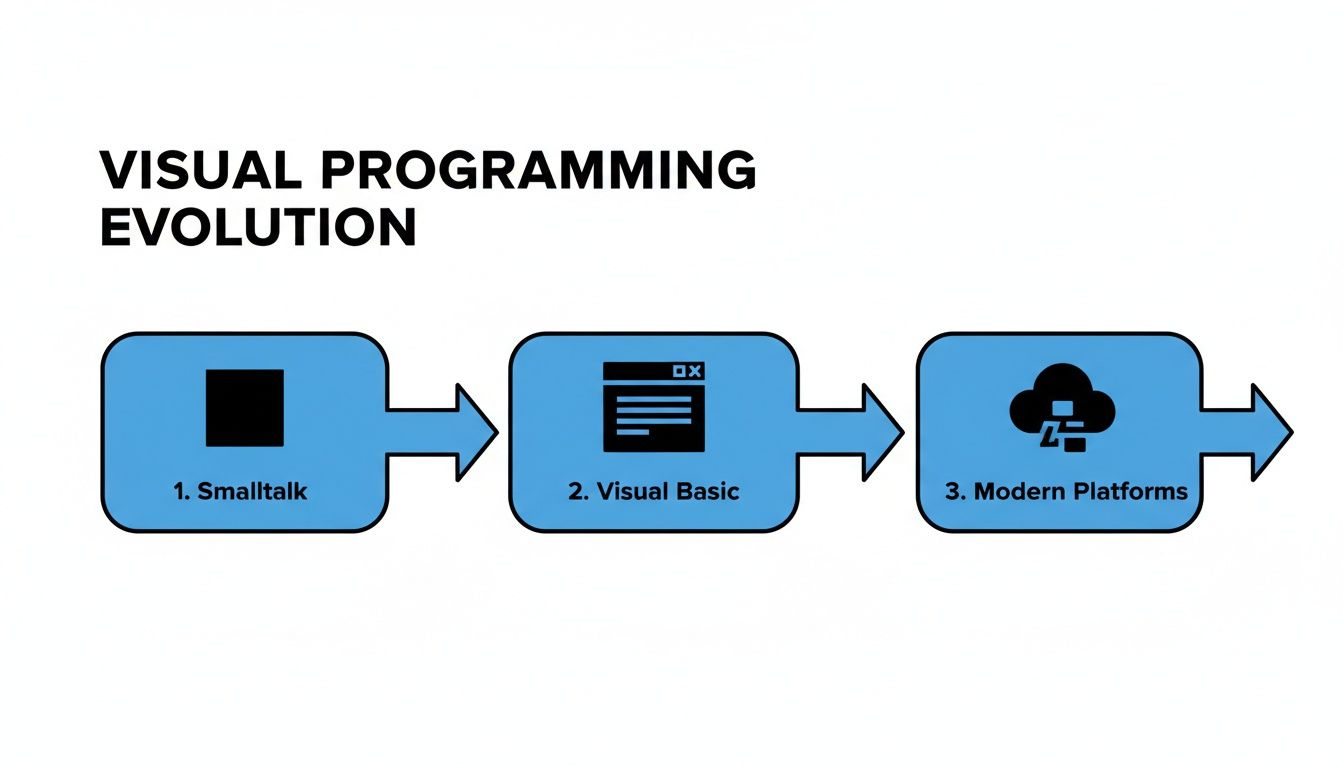
You can see a clear trend here: we've steadily moved away from low-level block representations toward full-blown application development in the cloud.
Two Dominant Paradigms
This translation from clicks to code usually happens in one of two ways, and each is suited for different kinds of jobs.
One common method is flow-based programming. Here, you connect nodes in a diagram that shows how data moves through the system. This is perfect for defining workflows and data pipelines, like an automation that pulls data from an API, reformats it, and then pushes it into a database.
The other popular style is block-based programming. This is more like snapping together puzzle pieces, where each block represents a command or logical step. This approach is popular in educational tools and game engines like Unreal Engine's Blueprints because it makes it easy to build complex, event-driven logic by ensuring only compatible "shapes" can connect.
Essentially, a visual programming environment acts as an interpreter. It listens to your high-level, graphical instructions and writes the detailed, syntactically correct code so you don't have to.
This immediate feedback loop is what makes the whole process so powerful. By arranging these visual elements, you are quite literally assembling a program piece by piece, while the platform handles all the messy syntax in the background.
2. Choosing the Right Tool: Visual vs. Textual Coding
Deciding between visual programming and traditional textual coding isn’t about which one is flat-out "better." It's about picking the right tool for the job. Your choice really comes down to what you’re trying to build, who’s on your team, and how fast you need to get from a great idea to a working product.
Think of it like building a bookshelf. If you need a simple, sturdy shelf fast, grabbing a flat-pack kit is the smartest move. Visual programming is that kit—it gives you pre-made, reliable components you can piece together quickly to create something functional.
On the other hand, textual coding is like being a master woodworker starting with raw lumber. It gives you complete creative freedom and control down to the millimeter, but it demands a deep skillset and a whole lot more time.
When Visual Programming Excels
Visual development platforms are built from the ground up for speed and accessibility. This makes them a perfect fit for a few key situations where getting something done quickly is the top priority.
- Rapid Prototyping and MVPs: Got a new app idea? Instead of spending months on a "perfect" version one, visual tools let you build and test a functional prototype in a matter of days.
- Internal Tools and Dashboards: Your operations team needs an inventory tracker, or finance needs a new budget dashboard. Instead of joining a long engineering queue, they can build the exact tool they need themselves.
- Workflow Automation: Connecting different apps and automating routine business processes is exactly what the flowchart-style logic of visual platforms was made for.
The real magic here is empowerment. Visual programming puts the power to build directly into the hands of the business experts—the people who actually understand the problem inside and out. This cuts down on endless back-and-forth and lets innovation happen much faster.
This is especially true when it comes to the custom internal applications that keep a business running smoothly.
Where Textual Coding Holds Its Ground
Even with all the benefits of visual tools, traditional coding isn’t going anywhere. It’s still the undisputed champion for projects with highly specific or demanding requirements.
When performance is everything—think high-frequency trading systems or complex scientific simulations—the granular control you get from languages like C++ or Rust is absolutely essential. There's no substitute.
Likewise, when you're building foundational technology like an operating system, a new database, or a specialized machine learning algorithm, you need the deep-level access that only textual coding provides. In these cases, you're not just assembling parts; you're forging the parts themselves.
Visual Programming vs Textual Coding at a Glance
Choosing the right approach often comes down to a few key differences. Here’s a quick breakdown to help you see where each method shines.
| Attribute | Visual Programming | Textual Coding |
|---|---|---|
| Learning Curve | Low. Intuitive for non-technical users. | Steep. Requires learning syntax and logic. |
| Development Speed | Fast. Ideal for rapid prototyping and MVPs. | Slower. Involves writing, testing, and debugging code. |
| Flexibility | Limited to platform's components and integrations. | Nearly limitless. Full control over logic and architecture. |
| Primary Users | Business users, citizen developers, product managers. | Software engineers, data scientists, specialized developers. |
| Best For | Internal tools, dashboards, simple web/mobile apps. | Complex systems, high-performance apps, core infrastructure. |
| Maintenance | Easier. Logic is visible and often self-documenting. | Can be complex. Depends on code quality and documentation. |
Ultimately, the best choice depends entirely on your project's unique needs. The table above should give you a clearer picture of which path might be the better fit for your team.
The great news? This isn't always an "either/or" decision anymore. A new wave of hybrid platforms, including tools like FlyDash, are designed to offer the best of both worlds. They give you the speed of a visual interface for 90% of the work, but also let developers jump into a code editor to write custom logic whenever a unique challenge pops up. It's a model that blends rapid development with true, no-limits flexibility.
Real-World Use Cases for Visual Programming
Okay, let's bring this out of the theoretical and into the real world. Visual programming isn't just a neat concept; it's being used right now by companies to fix real problems, often without ever roping in their engineering departments. You really see the power of visual programming when you look at it in action.
Think about an operations manager drowning in spreadsheets to track inventory. Instead of filing a ticket and waiting months for a custom tool, she could use a visual platform to build exactly what she needs in an afternoon. She can just drag and drop elements for data entry, add some simple logic to automatically flag low-stock items, and hook it all up to a live dashboard.
Suddenly, the power shifts from waiting for someone else to build it to simply building it yourself. That’s a huge change that lets teams solve their own problems and speeds up the whole company.

Speeding Up Business Operations
And this isn't just about one person in one department. Visual tools are making a real dent in how businesses operate across the board.
Here are a few common scenarios:
- Marketing Automation: A marketing team can map out a workflow for new leads. They can visually connect the dots: when a new lead comes in from a web form, it’s automatically enriched with more data, gets scored, and is then sent to the right salesperson. No code required.
- Rapid Prototyping: A startup founder without a technical co-founder needs to show investors a working concept. With a visual builder, they can quickly assemble a functional prototype of their app, making the core idea tangible and far more convincing than a slide deck.
- Financial Reporting: A finance manager can build a dashboard that pulls live data from different sources to track spending against forecasts. This gives stakeholders a clear, up-to-the-minute view without anyone having to manually crunch numbers in a spreadsheet.
This idea has been around for a while. It has roots in tools like Visual Basic, which completely changed enterprise development back in the 90s. It let business experts build database-driven apps with a simple point-and-click interface, cutting development time from weeks down to days. We're seeing a similar shift today, with reports showing that 69% of enterprises using modern no-code tools are seeing project delivery that's 47% faster.
The real win here is speed and ownership. When the people who actually need the tools can build them, it frees up your engineering team to focus on the heavy lifting—the core product and complex technical challenges.
The Impact on the Bottom Line
This shift doesn't just feel good; it delivers results you can actually measure. When business experts can build their own solutions, you start to see tangible benefits.
- Lower Development Costs: You’re not leaning on expensive, specialized developers for every internal tool or dashboard. Many Fortune 500 companies have managed to cut these specific internal development costs by as much as 60%.
- Faster Rollouts: An idea for a new process or tool can go from concept to reality in days, not months. This kind of agility is a massive advantage, letting the business react quickly to new opportunities or internal needs.
- Better Efficiency: When a tool is built to perfectly match a team's workflow, all the awkward manual workarounds disappear. People can stop wasting time on tedious admin tasks and focus on work that actually drives the business forward.
The Good, The Bad, and The Realistic
To figure out if visual programming is the right move for you, you need to look at it from all angles. Like any tool, it has some incredible strengths that can make a huge difference, especially when it comes to speed and getting more people involved. But it's not a magic wand, and it's just as important to understand its trade-offs.
The biggest, most undeniable win is speed. I’m talking about a dramatic reduction in development time. A project that would take a developer weeks of coding can often be knocked out in a few days, sometimes even hours. This means teams can finally build that internal tool or prototype that's been stuck in the engineering backlog for months, turning a good idea into a working app without the long wait.
The Upside of Visual Development
Beyond just moving faster, visual programming changes the dynamic of how teams build things.
- Puts the experts in charge: It hands the keys to the people who actually understand the problem. Think about it: a finance expert knows exactly what they need in a reporting tool. Instead of trying to explain every last detail to a developer, they can just build it themselves.
- Gets everyone on the same page: A visual workflow acts as a shared language. When your product manager, designer, and developer can all look at the same screen and see the logic laid out, collaboration becomes so much smoother. It cuts down on the back-and-forth and those "that's not what I meant" moments.
- Makes handoffs less painful: The visual logic often documents itself. A new person joining the team can get the gist of how a workflow is put together just by looking at the diagram, which is a lifesaver for long-term maintenance.
Adopting visual programming isn't just about technology; it's a strategic decision. You're essentially unlocking the problem-solving skills of your entire team, not just the engineering department.
Recognizing the Constraints
Now for a reality check. Visual programming isn't the solution for every single problem, and knowing its limits will save you a lot of headaches later. For example, if you're building something that needs insane, down-to-the-metal performance—like a high-frequency trading platform—you're probably going to hit a ceiling.
Another thing to keep an eye on is vendor lock-in. Some platforms are like walled gardens; once you build your application there, getting it out can be a real challenge. You become dependent on that company's features, pricing, and future plans.
Finally, while having a library of pre-built components is what makes these tools so fast, it can also be a constraint. If you need a very specific, unique feature that isn't offered out-of-the-box, you might find yourself stuck. Thankfully, more modern tools like FlyDash get around this by letting you inject your own custom code, giving you the best of both worlds.
Common Questions About Visual Programming
As teams start to explore visual programming, a few questions always pop up. Let's tackle these head-on, because clearing up the common myths is the first step to understanding where these tools really shine.
One of the biggest questions I hear is, "Can this stuff actually build complex applications?" The answer is a resounding yes. We've moved way past the days of simple landing page builders.
Today's visual development platforms are used to create sophisticated internal tools, complex customer portals, and full-featured mobile apps. These aren't just pretty mockups; they're real applications with intricate business logic, connections to multiple databases, and integrations with third-party APIs.
Who Is It Really For?
This brings us to the next point of confusion: Is this just for "non-technical" people? While it's absolutely true that these tools empower business experts to build their own solutions, they're also a massive force multiplier for experienced developers.
Engineers are using visual platforms every day for things like:
- Rapid Prototyping: Why spend weeks coding a concept when you can build a fully functional prototype in a few hours? It's the fastest way to test an idea with real users.
- Internal Tooling: Every company needs custom dashboards, admin panels, and support tools. Visual builders let developers spin these up in a fraction of the time, so they can stay focused on the core product.
- Workflow Automation: Instead of writing complex scripts, developers can visually map out and connect automated processes, which is often faster and much easier to debug later.
What About Platform Lock-In?
Finally, there's the big one: vendor lock-in. It's a completely valid fear. Nobody wants to invest time and resources building a critical application on a platform that holds their data and code hostage.
The good news is that the industry has changed. While older tools often trapped you in a walled garden, modern solutions are built with flexibility in mind. Many now let you export the underlying code, connect to any standard database, and integrate using open APIs.
This gives you an escape hatch. You get the incredible speed of visual development without giving up long-term control over your own technology.
Ready to see how fast you can turn an idea into a working application? With FlyDash, you can build the exact internal tools you need in minutes, not months. Describe your app, and let our AI generate it for you. Start building for free at https://flydash.io.
Ready to Build Your App?
Turn your idea into a production-ready React Native app in minutes.
Free tools to get you started
Free AI PRD Generator
Generate a professional product requirements document in seconds. Describe your product idea and get a complete, structured PRD instantly.
Try it freeFree AI App Name Generator
Generate unique, brandable app name ideas with AI. Get creative name suggestions with taglines, brand colors, and monogram previews.
Try it freeFree AI App Icon Generator
Generate beautiful, professional app icons with AI. Describe your app and get multiple icon variations in different styles, ready for App Store and Google Play.
Try it freeFrequently Asked Questions
RapidNative is an AI-powered mobile app builder. Describe the app you want in plain English and RapidNative generates real, production-ready React Native screens you can preview, edit, and publish to the App Store or Google Play.