Inventory Management Software Comparison for Smart Decisions
A definitive inventory management software comparison. We analyze features, pricing, and scalability to help you select the right solution.
By Damini
12th Feb 2026
Last updated: 12th Feb 2026
Picking the right inventory management software isn't a one-size-fits-all decision. The best tool for you hinges entirely on your business model, your current scale, and where you're headed.
For a small business just finding its footing, a platform like Zoho Inventory often hits the sweet spot with its simplicity and affordable entry point. As you grow and start selling across multiple channels, you'll likely need the power of a tool like Cin7. For large enterprises managing complex supply chains, a comprehensive system like NetSuite becomes essential for deep operational control.
Why Your Software Choice Matters
Choosing inventory software isn't just about swapping out a spreadsheet for an app. It's a strategic move that has a direct line to your profitability, your customers' happiness, and your ability to grow without everything falling apart. Sticking with manual methods or the wrong tool is a recipe for expensive mistakes.
In fact, poor inventory planning is a massive problem, contributing to over $1.8 trillion in losses for retailers worldwide due to stock inaccuracies. The right system helps you shift from putting out fires to making smart, data-driven decisions.
Good software gives everyone in your company a single, reliable source of truth. It links your sales channels, warehouses, and accounting so that everyone is working from the same real-time information. That kind of clarity is what stops you from running out of a popular product and disappointing a customer, or from tying up cash in slow-moving items that just gather dust.
Core Evaluation Pillars
To cut through the noise of the crowded software market, you need to zero in on four key areas during your comparison:
- Core Features: Does the platform actually do what you need it to? Think barcode scanning, demand forecasting, or managing stock across multiple warehouses.
- Total Cost of Ownership (TCO): Don't just look at the monthly subscription. You have to factor in the costs of setup, employee training, and any custom integrations.
- Scalability and Integrations: Will this system grow with your business? Can it connect smoothly with the tools you already rely on, like your e-commerce platform, accounting software, and shipping carriers?
- Build vs. Buy Flexibility: Is an off-the-shelf solution really the answer? Sometimes, a custom internal tool—perhaps built on a platform like FlyDash—can give you a unique long-term advantage.
The goal isn't just to find a tool that solves today's inventory headaches. The best software becomes a central nervous system for your business, providing the intelligence and control needed for sustainable growth.
Navigating Your Options
This guide will break down each of these pillars with a detailed, side-by-side analysis of the leading options. We'll help you match specific features to your business needs, whether you're a small e-commerce startup or a complex global enterprise.
Use the following comparison table as a quick reference to understand how the market is segmented.
| Criteria | SMB Software (e.g., Zoho) | Mid-Market (e.g., Cin7) | Enterprise (e.g., NetSuite) |
|---|---|---|---|
| Primary Use Case | Startups, small retail | Growing multi-channel sellers | Global supply chains |
| Key Strength | Affordability & simplicity | E-commerce integration | End-to-end ERP features |
| Implementation | Days to a week | Weeks | Months |
| Customization | Low | Medium | High |
Comparing Core Software Features and Capabilities
It’s easy to get lost in feature checklists when you're comparing inventory management software. But the real goal is to figure out how those features will actually make your operations run smoother and solve your specific headaches. A tool that's perfect for one company can be a total mismatch for another, so you have to look beyond the marketing fluff.
This section digs into the core capabilities that really matter. We’ll break down how different tiers of software handle everything from basic stock counts to complex demand forecasting, using real-world examples to show you what separates them.
Choosing the right platform is always a balancing act between features, cost, and your own growth plans. This guide breaks down the three main pillars of that decision.
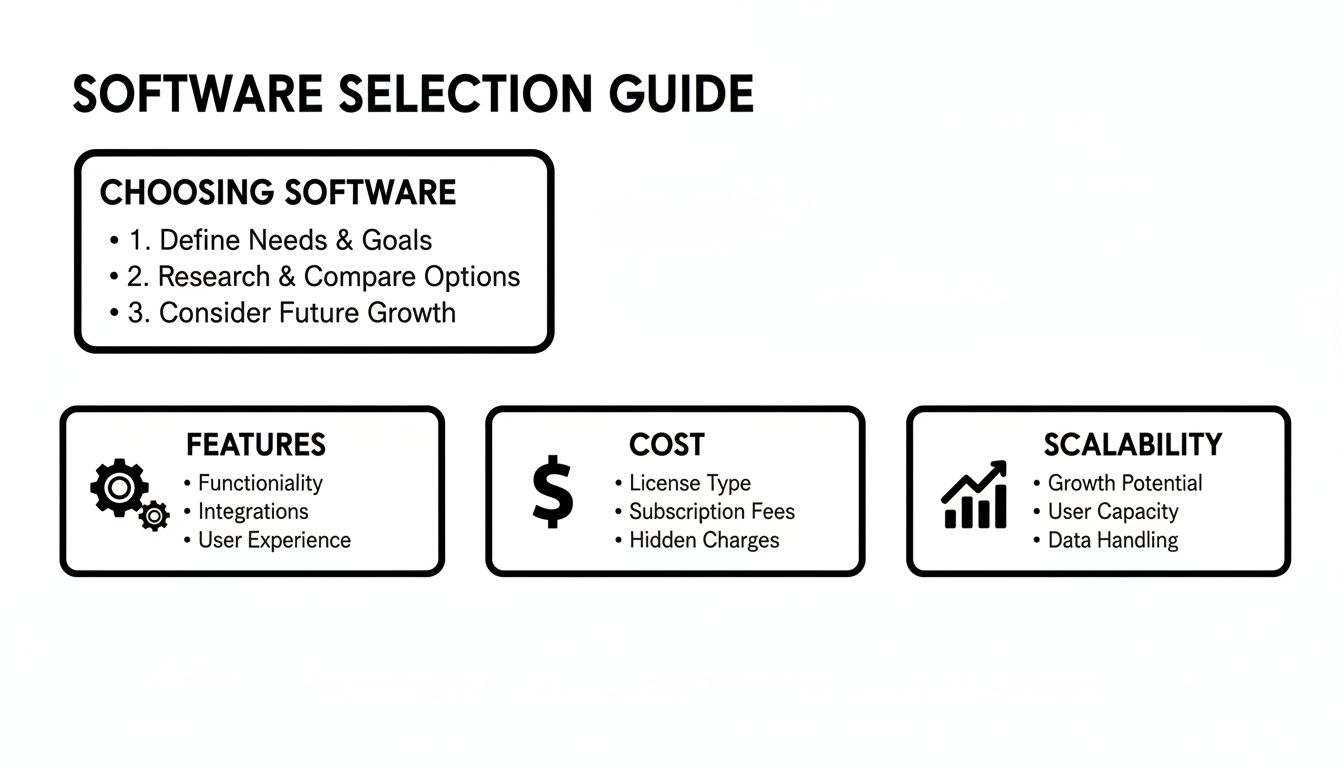
As you can see, the "best" software isn't about having the most features. It's about finding the right mix of capability, affordability, and the power to scale when you need it.
To get a clearer picture of how these solutions stack up, let's compare their core functionalities side-by-side.
Core Feature Comparison Across Inventory Solutions
| Feature | SMB Software (e.g., Zoho Inventory) | Mid-Market Software (e.g., Cin7) | Enterprise Software (e.g., NetSuite) | Custom Solution (e.g., via FlyDash) |
|---|---|---|---|---|
| Inventory Tracking | Basic barcode scanning, manual updates. Good for single locations. | Advanced mobile scanning, batch/serial tracking, cycle counting. | RFID, automated data capture, full warehouse management (WMS). | Fully tailored to your workflow, using any hardware you choose. |
| Demand Forecasting | Simple reorder points based on historical sales. | Algorithmic forecasting with seasonality and lead time analysis. | AI/ML-driven predictive analytics, multi-variable forecasting. | Custom algorithms built on your unique business data and logic. |
| Multi-Location | Basic support for multiple locations, often with manual transfers. | Centralized visibility, automated stock transfers, location-specific rules. | Full multi-subsidiary and global inventory network management. | Built from the ground up to support your exact distribution network. |
| Integrations | Pre-built connections to popular apps (e.g., Shopify, QuickBooks). | Extensive library of native integrations plus a solid API. | Deep, enterprise-grade integrations (ERP, CRM) and robust API. | Unlimited integration possibilities via a completely custom API. |
This table shows a clear progression. As you move from SMB tools to enterprise systems—and finally to custom builds—you gain more automation, deeper insights, and greater flexibility. Now, let's explore what that means in practice.
Real-Time Inventory Tracking and Control
At its heart, any inventory system needs to answer one question: what do I have, and where is it? The way different platforms answer that question has a huge impact on your accuracy and labor costs.
Entry-level systems usually get you started with manual updates or simple barcode scanning. It's a massive upgrade from spreadsheets, but it still means a human has to do something every time stock moves. For a small e-commerce shop shipping a few dozen orders a day from a single garage, that works just fine.
Step up to mid-market and enterprise tools, and you'll find more advanced tech. These systems automate data capture with mobile scanners and can even integrate with Radio-Frequency Identification (RFID) for high-volume warehouses. An RFID reader can scan an entire pallet in seconds without needing a direct line of sight—that's a game-changer for a bustling distribution center.
The inventory management software market is exploding, set to hit USD 10.5 billion by 2035. This boom is driven by a thirst for efficiency; barcode scanning holds a 60% market share, but RFID is used in about 30% of setups for its surgical precision. It's also no surprise that over 70% of businesses prefer cloud-based systems to keep their operational costs down. You can dig into the numbers yourself in this market research on inventory software trends.
The real differentiator isn't just if a system scans, but how it uses that data. A platform that instantly syncs a single scan across your Shopify store, Amazon listings, and physical shop prevents overselling and saves you from hours of manual reconciliation.
Demand Forecasting and Replenishment
Good forecasting is what separates businesses that are just getting by from those that are truly growing. It’s the difference between ordering reactively when you're almost out of stock and proactively buying based on data, which frees up your cash flow.
Here’s how different types of software tackle this:
- Basic Systems: These tools often use past sales to set simple reorder points. For instance, you get an alert to buy more widgets when your stock drops below 20 units. It's a helpful start, but it can't see seasonality or market shifts coming.
- Advanced Systems: Mid-market and enterprise platforms use much smarter algorithms. They look at historical data, seasonality, supplier lead times, and even market trends to suggest what you should order. This stops you from running out of best-sellers while also preventing you from getting stuck with a warehouse full of duds.
- AI-Driven Forecasting: The top-tier solutions use machine learning to predict demand with scary accuracy. These systems spot subtle patterns a human would never catch, like how a sale on one item might boost demand for a completely different product.
Think about a fashion retailer—an AI-powered system could help predict next season’s hot styles so they order correctly. On the other hand, a local hardware store with steady demand for nuts and bolts can run perfectly well with a simpler, history-based model.
Multi-Location and Channel Management
As your business expands, so does the chaos. Managing inventory across multiple warehouses, retail stores, and online channels is a common growing pain that basic software just can’t handle.
A simple SMB tool might let you create different "locations," but moving stock between them is often a clunky, manual task. That’s a recipe for inaccurate data and angry customers waiting on delayed shipments.
More powerful platforms are designed for this kind of complexity. They give you a single dashboard to see all your stock across every location. You can set unique reorder points for each warehouse and even automate transfers to keep inventory balanced. For a brand with three fulfillment centers and a dozen retail stores, this isn't a luxury—it's essential.
Integrations and API Capabilities
Your inventory system can't live on an island. It needs to talk to all your other business tools—accounting software, e-commerce platforms, shipping carriers—to create a smooth, automated workflow.
- Native Integrations: Most platforms come with pre-built connectors for popular tools like QuickBooks, Shopify, or ShipStation. These are usually plug-and-play and work great for standard business processes.
- API Access: This is where the real power lies. An Application Programming Interface (API) gives you the ultimate flexibility to build custom connections to any other software. Your developers can sync data in real-time and create workflows perfectly matched to how you do business.
If you use a homegrown CRM, for example, you'd need a system with a solid API to sync customer orders with your stock levels. When you're comparing software, always check out the quality of its API documentation. A great API is a sign that the platform can grow with you. And for those times when no off-the-shelf tool quite fits, building your own solution with a platform like FlyDash gives you complete control over every integration and workflow.
Understanding Pricing and Total Cost of Ownership

The sticker price of inventory management software is just the tip of the iceberg. To make a smart financial decision, you absolutely have to look past the advertised monthly fee and calculate the Total Cost of Ownership (TCO). Think of TCO as the true, long-term price tag, accounting for every direct and indirect cost you'll face over the software's entire lifecycle.
Running a thorough TCO analysis is what separates a good investment from a future budget headache. It's the only way to ensure the solution you pick is actually sustainable as your business grows.
Deconstructing Common Pricing Models
Software vendors have a few go-to ways of structuring their pricing, and each one hits your budget differently. Getting a handle on these models is the first step toward building a realistic financial forecast.
- Per-User/Per-Seat Fees: This is the most straightforward model. You pay a set fee—usually monthly or annually—for each person on your team who needs access. It’s predictable, but the costs can creep up quickly as you hire more people.
- Tiered Plans: Most SaaS providers bundle features into packages like Basic, Pro, or Enterprise. The catch is that these tiers often put a ceiling on critical metrics, like the number of orders you can process, SKUs you can manage, or warehouses you can operate.
- Transaction-Based Costs: Some platforms will charge a small fee or a percentage for every order that runs through their system. This approach ties your costs directly to your sales volume, which can be a real advantage if your business is seasonal or has unpredictable demand.
You’ll also see a lot of hybrid models that mix a base subscription with some form of usage-based fees. It’s crucial to read the fine print here to see exactly what triggers those extra charges.
The cheapest monthly plan can easily become the most expensive option in the long run. If you’re constantly bumping up against usage limits or paying for add-ons that should be standard, you're not saving money.
Uncovering the Hidden Costs
The real budget-killers are often the expenses that never make it onto the pricing page. These hidden costs can dramatically inflate your TCO, so you need to factor them in from day one.
Implementation and Onboarding
Getting a new system up and running is rarely a simple click-and-go affair. You need to budget for some very real, and often substantial, initial costs.
- Implementation Fees: Many providers charge a one-time fee for professional setup, system configuration, and a guided onboarding process.
- Data Migration: Moving your product catalog, sales history, and supplier lists from old spreadsheets or a legacy system is a heavy lift. It often requires specialized services, which come at a premium.
- Mandatory Training: Some vendors require your team to go through paid training courses. While this can be valuable, it’s another upfront cost to add to your tally.
Ongoing and Operational Expenses
Your financial commitment doesn't end once you're live. These operational costs are a permanent part of the TCO equation.
- Premium Support: Basic customer support is usually included, but if you want priority access or a dedicated account manager, you'll almost certainly have to pay extra.
- API Access Charges: Need to build a custom integration? Some platforms will charge you just for the privilege of accessing their API, turning a necessary function into another line item on your bill.
- Hardware Investments: Don't forget the physical gear. A new system might mean you need to buy barcode scanners, label printers, or tablets for your warehouse team. These costs can add up fast.
By mapping out all these potential expenses over a 3-5 year horizon, you can build an accurate TCO projection. This is the only way to compare solutions based on their true financial impact, ensuring you choose a partner that can actually support your growth without breaking the bank.
Analyzing Scalability and Technical Flexibility
Your ambition shouldn't be boxed in by your software. When you're comparing inventory management systems, it’s all too easy to get laser-focused on solving today's headaches. But the real test? Finding a platform that can keep up with you two, five, or even ten years down the road. This is where scalability and technical flexibility shift from being nice-to-haves to absolute must-haves for founders, CTOs, and operations leaders.
True scalability isn't just about handling a surge in orders. It’s about the system’s ability to grow with your business across every dimension: ballooning SKU counts, higher transaction volumes, more warehouse locations, and a bigger team. A system that’s zippy with 1,000 SKUs can easily grind to a halt at 50,000, creating the exact kind of operational drag that kills momentum.
Assessing a Platform's Growth Potential
A system’s underlying architecture is what really determines its ability to scale. Modern systems are built for this. Cloud deployment, for instance, is the clear winner in this space, growing at a blistering 13.85% CAGR through 2031. It slashes upfront hardware costs by a massive 40-60% and gives you the on-demand scalability you need for a booming e-commerce operation. Finance leaders love it for the real-time visibility, too.
Subscription models also get rid of huge capital expenditures, and the ROI can be staggering—often hitting 200-300% in the first year alone. That's because features like automated reorder points can trim carrying costs by 20-35%. You can dig deeper into these numbers with these market growth insights for inventory management software.
To really pressure-test a platform’s readiness for growth, look for these signs:
- Performance Under Load: Don't just take their word for it. Ask vendors for case studies or performance benchmarks from clients with transaction volumes bigger than yours.
- Database Architecture: A solid database should handle millions of records without a noticeable drop in speed.
- Infrastructure: Is the provider running on a major cloud service like AWS or Azure? These platforms have proven, on-demand scalability built in.
The Power of APIs and Technical Adaptability
This is what separates a rigid, walled-off tool from a genuine business platform: technical flexibility. The key to that flexibility is the Application Programming Interface, or API. Think of the API as the universal translator that lets your inventory system talk to every other piece of software in your tech stack—from your e-commerce storefront to your accounting software.
A powerful, well-documented API gives your development team the freedom to build custom workflows, automate unique processes, and plug into any new tool you adopt down the line. On the flip side, a monolithic platform with a weak or non-existent API locks you into its world, forcing you to warp your business processes around the software’s limitations.
When you choose a software, you're not just buying a set of features; you're investing in its underlying technical architecture. An API-first approach is a clear signal that the platform is built for integration and future-proofing.
When your technical team vets a system, they should be scrutinizing these elements:
- API Documentation: Is it clear, complete, and actually useful for developers?
- Rate Limits: How many API calls can you make per minute? If the limit is too low, it can choke real-time data syncs.
- Webhook Availability: Does the platform offer webhooks? This is a crucial piece of tech that lets other applications get real-time updates from your inventory system automatically, without constant polling.
The Strategic Choice of Building a Custom Tool
The classic "build vs. buy" debate is a huge part of any serious inventory management software comparison. Off-the-shelf software gets you started fast, but it almost always involves compromises. You might end up paying for enterprise-level features you’ll never touch, or worse, find that the one critical workflow you need is simply impossible to build.
This is where building a custom internal tool becomes a powerful strategic option. Using a platform like FlyDash, a technical team can build an inventory system that is perfectly molded to your unique business operations. This path gives you total control over every feature, workflow, and integration.
Building your own solution can create a real competitive advantage by letting you design processes that are leaner and more efficient than your competitors'. You sidestep vendor lock-in, you control your own technology roadmap, and you ensure the tool scales exactly with your business—without ever paying for bloat you don't want. It’s an upfront investment of time and resources, but the long-term payoff in flexibility and efficiency can be enormous.
Finding the Right Software for Your Business Stage
Choosing an inventory management system isn't about finding the "best" one—it's about finding the right one for your specific operation. The software that works for a garage-based startup will cripple a global enterprise, and vice versa. What matters most is aligning the tool's capabilities with your current complexity, business model, and where you're headed next.
Let's move past generic feature lists and look at which tools actually make sense for different types of businesses. This is a practical guide to matching the software to the real-world scenario.
The Bootstrapped E-commerce Store
If you're just starting out, running your e-commerce shop from a small warehouse or even your garage, your biggest priority is control without breaking the bank. You've graduated from spreadsheets and need to stop overselling on Shopify or Amazon, but you don’t need a system built for a massive distribution center.
- Ideal Solution: An entry-level, cloud-based tool like Zoho Inventory or QuickBooks Commerce.
- Why It Fits: These platforms are affordable and incredibly easy to get up and running. They deliver the core features you need right now: barcode scanning, syncing inventory across your online stores, and managing orders without a steep learning curve. You won't need an IT department to make it work.
At this stage, simplicity is your friend. The goal is to gain accuracy and efficiency without getting bogged down by features you won't use.
The Scaling SMB with Multiple Warehouses
Once your brand takes off and you're managing inventory across several warehouses or retail stores, the game changes completely. Suddenly, centralized visibility is everything. You need a system that can see stock levels everywhere in real-time and even automate transfers between locations to prevent stockouts in one region while another is overstocked.
Your inventory software needs to become the central nervous system for your entire operation. It has to pull data from every channel and location into a single, reliable source of truth that you can actually base decisions on.
A mid-market platform like Cin7 was built for this exact challenge. It shines at managing multiple channels and locations, offering automated purchasing, in-depth reporting, and critical integrations with 3PLs and POS systems. It gives a growing business the operational muscle it needs without the hefty price tag of an enterprise-level system.
The Large Enterprise with Complex Compliance
For a large enterprise juggling a global supply chain, the problems are on a different scale entirely. It's no longer just about tracking stock. You're dealing with strict regulatory compliance, sophisticated demand forecasting, and seamless integration with massive ERP systems. Here, a 0.5% efficiency gain can translate into millions of dollars saved.
- Ideal Solution: Enterprise-grade platforms like NetSuite or SAP Inventory Management.
- Why It Fits: These systems are engineered for complexity. They provide robust support for Just-in-Time (JIT) inventory models, which slash carrying costs by scheduling goods to arrive exactly when needed. For manufacturers, features that support lean manufacturing principles are non-negotiable for cutting waste and delivering more value to the customer.
These platforms offer the granular control and predictive power needed to manage intricate logistics and meet demanding industry standards.
The Tech Company Needing a Custom Internal Tool
Sometimes, no off-the-shelf product will do. If your business has a unique fulfillment model, proprietary hardware to track, or a very specific data workflow, standard software often feels clunky and restrictive. Trying to shoehorn a unique process into a generic tool just creates friction and kills efficiency.
This is exactly when building a custom internal tool becomes the smartest move you can make. Instead of compromising your workflows, you can build a solution that's a perfect mirror of your business logic.
- Ideal Solution: Build a custom application using a low-code platform like FlyDash.
- Why It Fits: FlyDash allows your team to generate a full-stack application—frontend, backend, and database—in a matter of minutes. This gives you total flexibility to build precisely what you need, free from the vendor lock-in that comes with off-the-shelf software.
With a custom build, you can create integrations with any API, design workflows that match your exact operational steps, and you own the code outright. For any company where operational excellence is a competitive advantage, a tailored solution offers a huge long-term benefit that a standard software comparison simply can't capture.
Answering Your Key Software Questions
You've done the research, narrowed down the options, and now you're at the final hurdle. This is where the practical, make-or-break questions always come up. Getting these right is the key to choosing a tool that actually works for your business instead of just looking good on paper. Let’s tackle the big questions I hear most often from teams in your position.
When Is The Right Time to Move From Spreadsheets to Software?
If you're asking this question, you probably already know the answer. The real tipping point isn't a single event, but a series of painful symptoms that show your spreadsheets are holding you back.
Are you constantly running out of your best-selling products? Or is your capital tied up in slow-moving items gathering dust? Those are classic signs. Another huge one is seeing how many hours your team sinks into manual data entry—time that could be spent on literally anything else to grow the business.
The bottom line is this: if you can't pull up a live, accurate inventory count across every single channel and location in seconds, you've outgrown spreadsheets. They just don't have the real-time horsepower to keep up.
What Is a Realistic Implementation Timeline?
This is the "how long will this hurt?" question, and the answer completely depends on the complexity of your business.
- Small Businesses: For a straightforward cloud-based tool, you could be up and running in a few days, maybe a week at most. This usually just involves importing your product data and connecting to a platform like Shopify.
- Mid-Market Companies: Here, you're looking at a more involved project, typically 4-8 weeks. This timeline accounts for cleaning up and migrating historical data, setting up specific workflows, and integrating with essential systems like your accounting software or 3PLs.
- Enterprise-Level Operations: A full-blown implementation tied into a larger ERP system is a significant undertaking. Plan for 6-12 months to get everything customized, integrated, and running smoothly.
A key advantage of modern development platforms is speed. When building a custom tool with a platform like FlyDash, a functional prototype can be generated in minutes, with a production-ready application developed in a fraction of the time required for traditional coding.
Which Integrations Are Most Critical?
For almost every business, a few core integrations are absolutely non-negotiable. Without them, you’re just creating more manual work.
Your system must connect seamlessly with your e-commerce platforms (think Shopify or BigCommerce), your accounting software (QuickBooks and Xero are the usual suspects), and your shipping solutions like ShipStation.
If you’re running a larger or more complex operation, you’ll also need to think about connections to your Enterprise Resource Planning (ERP), Customer Relationship Management (CRM), and Point of Sale (POS) systems. A robust API is your best friend here—it ensures you won't be boxed in when you need to add new tools down the road.
Ready to build an internal tool that perfectly matches your workflow, without the compromises of off-the-shelf software? With FlyDash, you can generate a complete, production-ready application in minutes, giving you total control and flexibility. Build your custom inventory tool today.
Ready to Build Your App?
Turn your idea into a production-ready React Native app in minutes.
Free tools to get you started
Free AI PRD Generator
Generate a professional product requirements document in seconds. Describe your product idea and get a complete, structured PRD instantly.
Try it freeFree AI App Name Generator
Generate unique, brandable app name ideas with AI. Get creative name suggestions with taglines, brand colors, and monogram previews.
Try it freeFree AI App Icon Generator
Generate beautiful, professional app icons with AI. Describe your app and get multiple icon variations in different styles, ready for App Store and Google Play.
Try it freeFrequently Asked Questions
RapidNative is an AI-powered mobile app builder. Describe the app you want in plain English and RapidNative generates real, production-ready React Native screens you can preview, edit, and publish to the App Store or Google Play.