How to Design a Web Application A Practical Guide
Learn how to design a web application from concept to launch. This guide covers user research, tech stacks, UI/UX, security, and modern development tools.
By Riya
2nd Feb 2026
Last updated: 2nd Feb 2026

Every great web application starts not with a line of code, but with a question. What problem are we actually solving, and for whom? This initial phase is all about building a solid foundation through research and strategy. It's tempting to jump straight into mockups and development, but skipping this groundwork is a classic mistake—one that almost always leads to costly rework and an app that just doesn't hit the mark.
Building Your Foundation with Research and Strategy

Before you even think about pixels or programming languages, you need to translate that vague idea in your head into a concrete, actionable plan. It all begins by getting laser-focused on the core problem.
Think of an operations manager drowning in spreadsheets, trying to track inventory across multiple warehouses. The problem isn't just "inventory management." It's the crippling lack of a centralized, real-time overview that leads to constant stockouts or wasteful overstocking. That's the specific pain point you're aiming to fix.
Defining Your Audience and Business Goals
Knowing exactly who you're building for is non-negotiable. This goes way beyond basic demographics. You need to craft detailed user personas—semi-fictional profiles of your ideal users, built from real interviews, surveys, and market analysis.
Let's imagine a persona for an internal dashboard we're building: "Alex, the Operations Manager."
- Goals: Alex needs to see daily logistics KPIs at a glance. Quick, scannable data helps him make immediate staffing decisions for the day.
- Frustrations: His current workflow is a nightmare. He has to manually pull data from three different spreadsheets, a process that’s not just slow but also riddled with errors.
- Technical Skill: He's comfortable using software but isn't a developer. The interface has to be intuitive, with almost no learning curve.
From now on, Alex is in the room for every design decision. This persona becomes your north star, ensuring you build features people actually need. At the same time, you need to tie this back to clear business objectives. Are you trying to reduce operational costs by 15%? Boost team productivity? Improve data accuracy? These goals are how you'll measure success.
The most effective web application designs are born from a deep empathy for the user's daily struggles. If you solve a real, tangible problem for them, you're already halfway to a successful product.
Conducting Competitive Analysis
Your application won't exist in a vacuum. A thorough competitive analysis is your chance to understand the market, spot gaps, and figure out what makes your product unique. Look at both direct competitors (those who do exactly what you plan to do) and indirect ones (those who solve the same problem in a different way).
Dive deep into their features, user experience, pricing, and what their customers are saying in reviews. Don't just make a list of what they offer. Look for what they don't do well. Maybe a rival's dashboard is incredibly powerful but notoriously difficult to set up. That's your opening. You can win by offering a simpler, more user-friendly onboarding experience.
This kind of strategic positioning is absolutely critical. The global web development market is expected to grow from $74.69 billion in 2025 to $104.31 billion by 2030, and it's no surprise when you consider that 71% of businesses now rely on a strong digital presence to compete. You can find more web development statistics on esparkinfo.com.
Gathering and Documenting Requirements
The final step in this foundational stage is to pull all your research together into a clear set of requirements. This isn't just busywork; this document is the blueprint for the entire project. It gets stakeholders, designers, and developers all on the same page.
Think of it as a detailed checklist of every "must-have" feature needed to solve the user's problem and meet your business goals. For our inventory tool, the requirements might look something like this:
- User authentication with role-based access (managers see everything; warehouse staff only see their location).
- A centralized dashboard showing key metrics like stock levels, order status, and shipment times.
- The ability to search and filter inventory by SKU, location, or status.
- Real-time notifications for low-stock alerts sent via email or Slack.
Putting this all down in writing is your best defense against "scope creep"—that sneaky process where unplanned features get added, blowing up your timeline and budget. Getting this right transforms a rough idea into a well-defined project, ready to move into the design phase.
Your requirements document is the single source of truth for the project. The table below outlines the core components you should always include to keep everyone aligned.
Core Components of an Application Requirements Document
| Component | Description | Example |
|---|---|---|
| Project Vision | A high-level summary of the problem, the proposed solution, and the target audience. | "To create a real-time inventory dashboard for operations managers to reduce stockouts by 20% within six months." |
| User Personas | Detailed profiles of your target users, including their goals, frustrations, and behaviors. | "Alex, the 35-year-old Operations Manager who needs a quick, visual way to track inventory across three warehouses." |
| Functional Requirements | Specific features and functions the application must have. These are the "what" of the project. | "The system must allow users to search for products by SKU and filter results by warehouse location." |
| Non-Functional Requirements | System qualities like performance, security, and reliability. This is the "how well" of the project. | "The dashboard must load in under 2 seconds. The application must be compliant with GDPR." |
| Assumptions & Constraints | Any assumptions made during planning (e.g., API availability) and project limitations (e.g., budget, timeline). | "Constraint: The project must be completed within a $50,000 budget. Assumption: The existing warehouse API can provide real-time data." |
Having these elements clearly defined before you start building will save you countless hours and headaches down the road. It ensures everyone is working toward the exact same goal.
Bringing Your Web App to Life with Design
Okay, you’ve got your strategy nailed down and a solid list of requirements. Now for the fun part: figuring out what this web application will actually look, feel, and act like. This is where we move from abstract ideas to a concrete user experience (UX) and user interface (UI). Don't get caught up in picking the perfect shade of blue just yet—this is about building a solid, intuitive framework that guides people where they need to go without them having to think about it.
The whole point is to design something that feels like a natural extension of a person's own workflow. When a user opens your dashboard or internal tool, they shouldn't be squinting at the screen, hunting for a button, or wondering what to do next. A great design anticipates what they need and serves it up clearly and logically.
Start with the Blueprint: Information Architecture
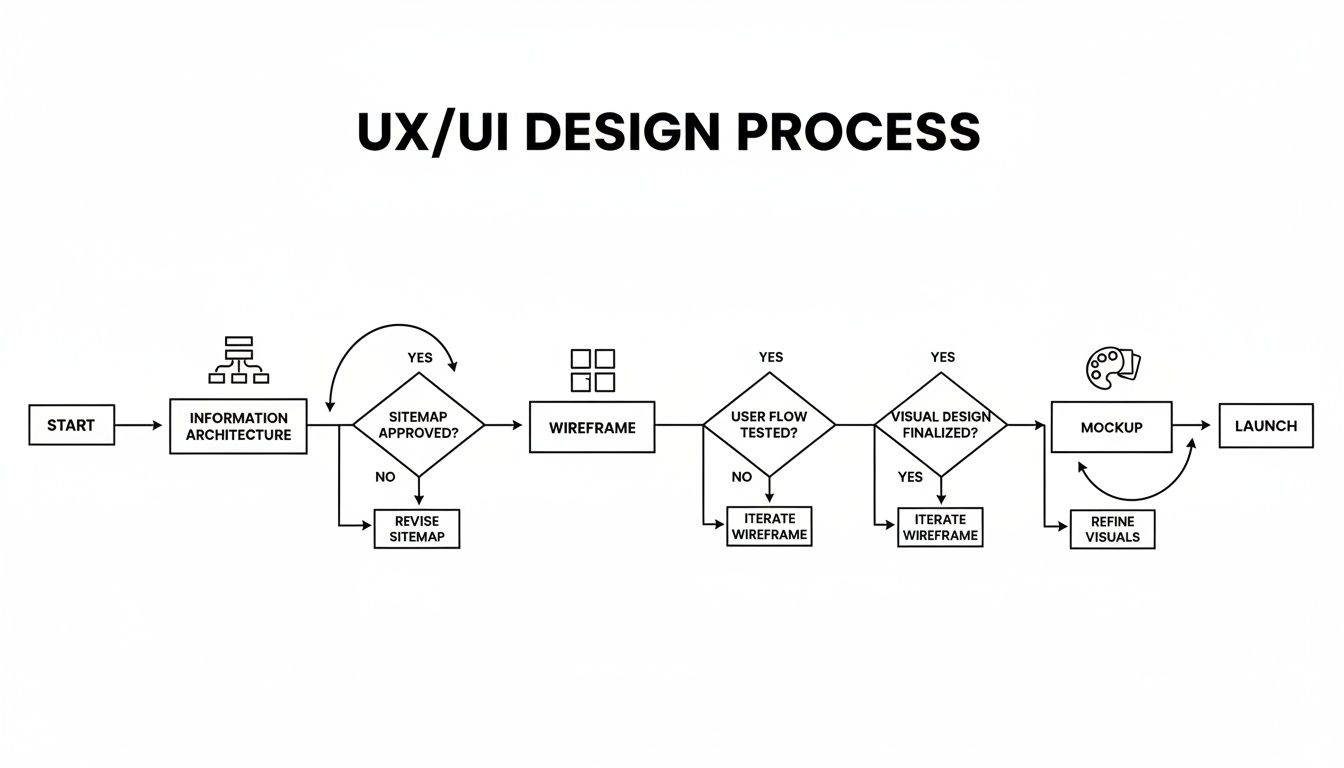
Before you sketch a single screen, you need to map out your application's content and features. This is called Information Architecture (IA), and it's basically the blueprint for your entire app. Think of it like a sitemap for a website or the floor plan for a house; it’s all about making sure everything has a sensible home.
Let's imagine we're building that internal inventory tool. The IA would help us organize the main sections:
- Dashboard: The landing page with at-a-glance KPIs.
- Inventory Management: The core area for viewing, adding, and editing products.
- Order Tracking: A dedicated view for monitoring inbound and outbound shipments.
- Reports: The hub for pulling analytics and data.
- Settings: Where users manage their profiles, notifications, etc.
Laying this out gives you a bird's-eye view of the entire application. It’s a simple step that saves you from creating confusing dead-ends or tangled user journeys down the road. A clear IA is the bedrock of a good user experience.
From Rough Sketches to Polished Designs
With the structure in place, it’s time to start visualizing it with wireframes. These are just simple, low-fidelity sketches. Seriously, think black and white boxes. Their only job is to define the layout, structure, and flow. They aren't supposed to be pretty—they’re there to answer one question: "Where does everything go?"
Wireframing is fantastic because it's cheap, fast, and lets you burn through ideas quickly. You can test out different dashboard layouts without getting sidetracked by fonts and colors. For instance, should the filters live in a sidebar or as dropdowns above a table? Wireframes let you figure that out in minutes, not hours.
Once everyone on the team agrees on the basic layout, you can move on to high-fidelity mockups. This is where the visual identity comes alive. These are the detailed, full-color designs that look like the real, finished product. They include the final UI elements, typography, color palettes, and branding. This is the step that turns that structural blueprint into a polished, great-looking interface.
An interface is like a good joke—if you have to explain it, it’s not that good. The best designs are self-evident, guiding users to their goals with minimal cognitive load.
Sticking to Core UI and UX Principles
As you’re deep in design mode, keep a few fundamental principles in mind. They’re the difference between an app that’s merely usable and one that’s actually enjoyable to work with.
- Consistency is Key: Elements should look and behave the same way everywhere. If the "Save" button is a green button in the bottom-right corner of one modal, it should be that way in all modals. This predictability makes users feel confident and in control.
- Always Provide Feedback: The interface needs to talk back to the user. When someone saves a form, show a quick "Success!" message. If a file is uploading, show a progress bar. This visual confirmation is crucial; it tells the user, "I heard you, and I'm on it."
- Design for Everyone (Accessibility): Your app should be usable by as many people as possible, including those with disabilities. That means things like using sufficient color contrast, adding alt text to images, and making sure someone can navigate the entire app using only their keyboard.
- Performance is a Feature: A stunning design is worthless if it takes forever to load. Speed is a critical part of the user experience. You might be surprised to learn that a mere 100ms delay in load time can cause a 1% drop in sales for e-commerce sites, which shows just how much performance matters. You can read more about the impact of performance on user engagement to see just how deep this goes.
By keeping these principles at the forefront, you’ll end up with a design that's not just robust and inclusive, but efficient—creating a genuinely positive experience that people will actually want to use.
Choosing the Right Technology Stack and Data Model
With a solid UX blueprint in hand, it’s time to get into the nuts and bolts of how you'll actually build this thing. This is where we pick the technical foundation—the frontend, backend, and database technologies that will bring your application to life. These aren't just technical details; the choices you make here will echo through the entire project, impacting performance, scalability, and how painful (or easy) it is to add features down the road.
Picking a technology stack isn't about chasing the latest, trendiest framework you saw on Twitter. It’s a strategic decision that needs to be grounded in your project's reality. A simple internal dashboard with a few charts has completely different needs than a complex, real-time collaboration tool. You're trying to find the sweet spot between developer happiness, performance, and long-term maintainability.
Assembling Your Frontend Technology
The frontend is everything your user actually sees and touches in their browser. It’s the part where your beautiful mockups become a living, breathing interface. The big decision here usually boils down to which JavaScript framework or library will help you build that UI without pulling your hair out.
For most projects, you'll be looking at a few major players. For instance, a staggering 43% of developers prefer using React to build dynamic and interactive web apps. Its component-based architecture is a game-changer for efficiency. You can build a single, customizable DataTable component once and then reuse it everywhere—from an inventory list to a user management screen. That’s a huge time-saver.
React’s declarative approach, which you can see in its docs, lets you design simple views for each state in your app. This makes your code more predictable and way easier to debug when things go wrong, which really speeds up development, especially for complex interfaces.
Selecting the Right Backend and Database
If the frontend is the car's interior, the backend is the engine. It's all the server-side logic that crunches data, enforces business rules, and talks to the database. Just like on the frontend, you've got a ton of options, each with its own strengths.
Node.js is an absolute powerhouse here, used by 62.3% of developers globally for building fast, scalable backends. Its event-driven architecture makes it perfect for apps that need to handle tons of simultaneous connections, like a real-time chat feature or a live analytics dashboard. You can dig into more of these web development statistics to see the trends. Of course, there are other great choices like Python with Django for getting things done quickly or Go for raw, high-performance systems.
Your database choice is just as critical and is tied directly to the kind of data you're working with.
-
SQL Databases (like PostgreSQL, MySQL): Think of these as highly organized spreadsheets. They store data in structured tables with a strict schema. If data integrity is non-negotiable—like in a financial app where every transaction has to be perfect—SQL is your best friend.
-
NoSQL Databases (like MongoDB, DynamoDB): These are the flexible, free-form alternative. They're fantastic for unstructured or rapidly evolving data, like what you’d find in a content management system or an app that pulls in data from all sorts of different places.
Picking a database is more than a technical footnote; it’s a decision about how your app will grow. A good data model makes development smoother and keeps performance snappy. The wrong one creates constant headaches.
To help visualize this decision, I've found a simple matrix can cut through the noise. It forces you to evaluate your options against what really matters for your project.
Tech Stack Decision Matrix for Your Web App
| Criteria | Option A (e.g., React/Node.js/PostgreSQL) | Option B (e.g., Vue/Python/MongoDB) | Best For |
|---|---|---|---|
| Performance Needs | Excellent for real-time apps due to Node.js's non-blocking I/O. | Solid, but Python can be slower for I/O-heavy tasks. Great for data science. | Option A for chat, dashboards. Option B for analytics. |
| Scalability | Horizontally scalable. Great for microservices. | Monolithic by default (Django), but can be scaled. | Option A for large, distributed systems. |
| Team Expertise | Massive talent pool for JavaScript/React/Node.js. | Strong community, especially in data science and academia. | Whichever stack your current team knows best. |
| Development Speed | Fast for experienced teams. Huge ecosystem of libraries. | Django's "batteries-included" approach can be very fast for standard apps. | Option B for rapid prototyping of CRUD apps. |
| Data Structure | Best for structured, relational data with high integrity needs. | Ideal for flexible, semi-structured, or evolving data schemas. | Option A for e-commerce, finance. Option B for CMS, IoT. |
This table isn't about finding a "winner" but about clarifying trade-offs. The "best" stack is the one that aligns with your specific project goals, budget, and team skills.
Structuring Your Data Model
Once you’ve picked a database, you need to design the data model. This is the blueprint for how your information is organized, stored, and connected. Get this right, and your app will be efficient and easy to query. Get it wrong, and you're in for a world of performance bottlenecks.
For example, in that inventory management tool we talked about, a good relational model would have a Products table, a Warehouses table, and a StockLevels table linking them. This prevents you from duplicating information and makes it trivial to ask, "How many widgets do we have in the Dallas warehouse?"
This initial technical planning, from your information architecture to your data model, is what makes a seamless UI even possible. It's the sturdy foundation that lets the rest of the house stand tall.
Weaving Security and Performance into Your Design

Here’s a hard truth: security and performance aren't features you can just bolt on at the end. They have to be baked into your design from the very first sketch. If you treat them as an afterthought, you’re just accumulating technical debt that will eventually lead to a disastrous data breach or an app so slow that users give up and never return.
Thinking about these critical elements from day one is how you build an application that earns and keeps user trust. It’s about creating a foundation that’s both rock-solid and lightning-fast.
Proactive Security by Design
The best defense is a good offense. Adopting a "secure by design" mindset means you're building defenses directly into the architecture to anticipate threats before they happen, not just reacting after the fact. Two of the oldest and most common threats, SQL injection and Cross-Site Scripting (XSS), are still incredibly prevalent, but they're also highly preventable.
Your first line of defense is always input validation. Never, ever trust user-submitted data. It doesn't matter if it's from a simple contact form or a complex file upload; you have to sanitize and validate everything on the backend to ensure it's in the exact format you expect. This one practice shuts down a massive range of potential attacks.
An application's security is only as strong as its weakest link. A single unvalidated form field can be the open door an attacker is looking for. Make security a default, not an afterthought.
Beyond that, you absolutely have to nail your authentication.
- Use Proven Libraries: Don't try to roll your own authentication system. It’s a solved problem. Use battle-tested libraries like Passport.js or established services like Auth0 that security experts have already vetted.
- Enforce Strong Passwords: Implement policies that require complex passwords. Even better, add multi-factor authentication (MFA) for a massive security boost.
- Secure Session Management: Make sure session tokens are generated securely, stored properly (e.g., in HttpOnly cookies), and are immediately invalidated on logout to stop session hijacking cold.
These aren't just items on a checklist. They're fundamental to protecting your users' data and, frankly, your company's reputation.
Engineering for Peak Performance
A slow application just feels broken. We live in a world of instant gratification, and performance is a feature that directly impacts user satisfaction and your bottom line. The goal is to make your application feel instantaneous, which requires careful planning from the start.
A great place to begin is by optimizing how your assets get to the user's browser. Modern frontend frameworks give you some powerful tools for this.
- Code Splitting: This breaks your app's code into smaller chunks that are loaded only when needed. Instead of making a user download everything on their first visit, they just get the code for the page they're actually looking at.
- Lazy Loading: In the same vein, don't load all your images and components at once. Lazy loading waits to load off-screen assets until the user scrolls them into view, which can dramatically speed up initial page loads.
- Image Optimization: This is a big one. Compress your images and serve them in modern, efficient formats like WebP. A single, unoptimized hero image can easily be the biggest performance bottleneck on a page.
Choosing the Right Infrastructure
Even a perfectly designed app will feel sluggish if it's running on the wrong infrastructure. For any application with a global audience, latency—the physical time it takes for data to travel from your server to the user—is a huge hurdle.
This is where an edge network or Content Delivery Network (CDN) is a game-changer. A CDN caches copies of your static assets (images, CSS, JavaScript) in data centers all over the world. When a user in Tokyo requests your app, those assets are served from a nearby server in Asia, not from your main server in Virginia. This simple architectural decision can slash load times and create a consistently fast experience for every user, no matter where they are.
Using Modern Tools and AI to Accelerate Development

The old way of building a web app was a slow, linear slog through distinct phases. That's changing fast. Modern AI and low-code platforms are collapsing that timeline, letting you go from a simple text prompt to a functioning application in a tiny fraction of the time. This isn't just about speed; it's about fundamentally changing who gets to build software.
We've moved way beyond simple code assistants that just suggest the next line. A new wave of platforms can generate the entire stack—frontend, backend, and database—from a single, plain-English description. This new approach to designing a web application drops the barrier to entry so low that almost anyone on the team can become a creator.
Empowering Non-Technical Builders
Picture this: an operations manager is drowning in returned merchandise and desperately needs a way to track it all. The old way? Submit a ticket to an overloaded engineering team and hope they get to it in a few weeks.
The new way? They can use a platform like FlyDash and just describe what they need. They might type: "Build an app to track customer returns with fields for order ID, customer name, product, reason for return, and status."
Instantly, the AI interprets this and spits out a working dashboard. This is a game-changer. It turns subject-matter experts into builders who can solve their own problems without writing a line of code, freeing up senior engineers to focus on the complex, core product instead of one-off internal tools.
The real power of modern development tools is their ability to democratize creation. When the person who feels the pain point can build the solution, you get better, more relevant tools built in record time.
This isn't just a niche trend. Gartner projects the low-code market will hit $44.5 billion by 2026. The adoption numbers back this up, with 84% of developers already using or planning to use AI tools, and 51% using them daily. If you're curious, these emerging web development statistics paint a clear picture of how quickly things are moving.
Speeding Up the Developer Workflow
These tools aren't just for people who can't code; they're a massive force multiplier for experienced developers, too. Every project starts with a certain amount of grunt work—setting up authentication, building basic CRUD (Create, Read, Update, Delete) interfaces, configuring the database. It’s all necessary, but it’s also repetitive.
AI-powered platforms automate that initial grind. A developer can describe the data model and key features, and the AI generates all the foundational code. This lets them jump right into the interesting, complex problems, like nailing down custom business logic or integrating a tricky third-party API.
For instance, instead of hand-coding a user management dashboard from scratch, a dev can ask an AI tool to generate it. The platform handles the boring bits: a searchable table, forms for adding and editing users, and all the backend endpoints to make it work. The developer can then dive straight into the code to add advanced features, like role-based permissions or an integration with their marketing platform.
The key is that you retain full control. Unlike the restrictive, walled-garden low-code tools of the past, modern platforms are built for professional developers who need flexibility.
- Code Export: You can export the entire application as a standard, human-readable project (like React and Node.js). This means you’re never locked in and can host or modify it anywhere you want.
- Git Integration: Connect your own Git repository to manage versions, collaborate with your team, and stick to proper development practices.
- Full Customization: Pop open a code editor right inside the platform to tweak the UI, write custom backend logic, or fine-tune complex database queries.
This hybrid model gives you the best of both worlds: the incredible initial speed of a low-code tool combined with the power and flexibility of writing your own code. It’s a smarter, faster way to build, turning weeks of manual setup into a task that takes just a few minutes.
From Deployment to Continuous Improvement
Launching your app isn't the finish line. In many ways, it's just the beginning. All the design and development work you've done leads up to this moment, but a truly successful launch hinges on a rock-solid testing strategy. This is your last line of defense to ensure the application you've built is robust, reliable, and actually ready for people to use.
A good testing plan has layers. It starts small with unit tests, which are like little health checks for individual pieces of your code. Think of a function that calculates a total—a unit test makes sure it always returns the right number. From there, you move to integration tests, which check that different parts of your app can talk to each other correctly. Does the signup form on the frontend actually send the user's data to the backend API? That’s what an integration test verifies.
Finally, you have end-to-end (E2E) tests. These are the big ones. They mimic a real person using your application from start to finish. For an internal dashboard, an E2E test might involve simulating a user logging in, clicking through to a specific report, applying a date filter, and then exporting the results as a CSV. It’s the closest you can get to real-world usage without being a real user.
Automating Releases with CI/CD
If you're still deploying code by hand, you're making things harder—and riskier—than they need to be. Manual deployments are slow and a perfect recipe for human error. This is exactly why a CI/CD (Continuous Integration/Continuous Deployment) pipeline is a non-negotiable part of modern development. It’s the automated engine that lets you ship updates quickly and safely.
Here's how it breaks down:
- Continuous Integration (CI): Every time a developer commits new code, an automated process kicks off. It builds the application and runs your entire test suite. If a single test fails, the whole team gets an alert, stopping a bug in its tracks before it ever gets merged.
- Continuous Deployment (CD): Once the code passes every single test, the pipeline doesn't stop. It automatically pushes the changes live to your users. This completely removes the manual bottleneck, letting you move from scary, infrequent releases to a smooth, constant flow of small improvements.
Setting up a CI/CD pipeline fundamentally changes your workflow for the better. It builds confidence and discipline into your development process.
Monitoring and Iterating on Your Design
So, your app is live. Now what? You need to know what's happening out in the wild. Post-launch monitoring isn’t just about waiting for things to break; it's about actively gathering the intel you need to make smart decisions for your next design sprint.
You'll want to keep an eye on a few key areas:
- Performance Metrics: Watch your server response times, how fast pages are loading, and whether your database queries are getting sluggish. Tools can ping you the second performance starts to dip, so you can jump on a problem before most users even know it exists.
- Error Tracking: Set up a service that catches and reports application errors as they happen. You'll get a clear picture of what's breaking, how often, and who it's affecting. This makes prioritizing fixes a whole lot easier.
- User Behavior Analytics: This is where the gold is. See what features people are actually using. Where are they clicking? Where are they getting stuck or dropping off? This data is invaluable for spotting real opportunities to improve the user experience.
This constant feedback loop is the heart of continuous improvement. It's a cycle of building, shipping, monitoring, and learning. And as AI starts to handle more boilerplate coding, the demand for skilled web developers who can focus on strategy and innovation is only growing—employment is projected to jump by 8% through 2033. This shift frees up product teams to do what they do best: use real-world data to make the product better. You can read more about how AI is impacting web development roles.
A deployed application is a living product. The insights you gather from monitoring user behavior and performance are the most valuable resource you have for evolving your design and delivering lasting value.
Ready to skip the repetitive setup and go from idea to a fully functional internal tool in minutes? FlyDash uses AI to generate your entire application—frontend, backend, and database—from a simple text prompt. Try FlyDash and accelerate your development workflow today.
Ready to Build Your App?
Turn your idea into a production-ready React Native app in minutes.
Free tools to get you started
Free AI PRD Generator
Generate a professional product requirements document in seconds. Describe your product idea and get a complete, structured PRD instantly.
Try it freeFree AI App Name Generator
Generate unique, brandable app name ideas with AI. Get creative name suggestions with taglines, brand colors, and monogram previews.
Try it freeFree AI App Icon Generator
Generate beautiful, professional app icons with AI. Describe your app and get multiple icon variations in different styles, ready for App Store and Google Play.
Try it freeFrequently Asked Questions
RapidNative is an AI-powered mobile app builder. Describe the app you want in plain English and RapidNative generates real, production-ready React Native screens you can preview, edit, and publish to the App Store or Google Play.