A Guide to Business Process Automation Solutions That Work
Discover business process automation solutions that streamline workflows and boost efficiency. Learn how to choose, implement, and scale the right tools.
By Rishav
24th Jan 2026
Last updated: 24th Jan 2026
Business process automation solutions are essentially software tools built to take over the manual, repetitive tasks that clog up your team's day. They create automated workflows that can handle everything from data entry and invoice processing to customer onboarding. Think of it as a digital workforce that lets your people focus on the work that actually requires a human touch.
What Are Business Process Automation Solutions

Let's cut through the jargon for a second. Imagine the controlled chaos of a busy restaurant kitchen during a dinner rush. Without a solid system, orders get misplaced, ingredients are forgotten, and delays pile up. It’s a classic example of a manual process buckling under pressure.
Now, think about that same kitchen with a digital system. A customer's order is instantly captured, fired to the right station, and tracked in real-time. A server gets an alert the moment the dish is ready. That smooth, predictable flow is exactly what Business Process Automation (BPA) brings to the table. It turns messy manual steps into a smart, reliable operation.
The Core Goal of Automation
At its heart, BPA is about more than just speed—it's about making your processes fundamentally better. These solutions, whether they're simple scripts or powerful platforms like FlyDash, are designed to introduce order, consistency, and intelligence into how you work. They act as the digital glue that connects different systems, enforces your business rules, and makes sure tasks get done right, every single time.
This systematic approach delivers benefits that compound over time, driving real growth. You can see its impact in the market itself; the global business process automation market is on track to grow from $9 billion in 2019 to nearly $19.6 billion by 2026. That’s because companies are realizing that efficient workflows are no longer a luxury—they're a competitive necessity. You can dive deeper into the findings on the business process automation market.
Key Benefits Driving Adoption
Companies aren't just adopting business process automation solutions for the sake of technology; they're chasing specific, measurable results.
- Boosted Operational Efficiency: Automating routine tasks breaks up bottlenecks. Suddenly, processes that took days can be completed in minutes.
- Lower Costs and Fewer Errors: When machines handle the work, you reduce labor costs and eliminate the expensive typos and mistakes that come with manual data entry. Less rework means happier customers and a healthier bottom line.
- A More Focused Team: Freeing your team from tedious tasks allows them to apply their skills to what really matters—solving complex problems, innovating, and building customer relationships.
- Better Consistency and Compliance: Automated workflows follow the rules you set, every single time. This is a game-changer for maintaining quality control and meeting strict regulatory standards.
Getting this foundation right is the first step toward building a more competitive and scalable business.
Navigating the Main Types of Automation Tools
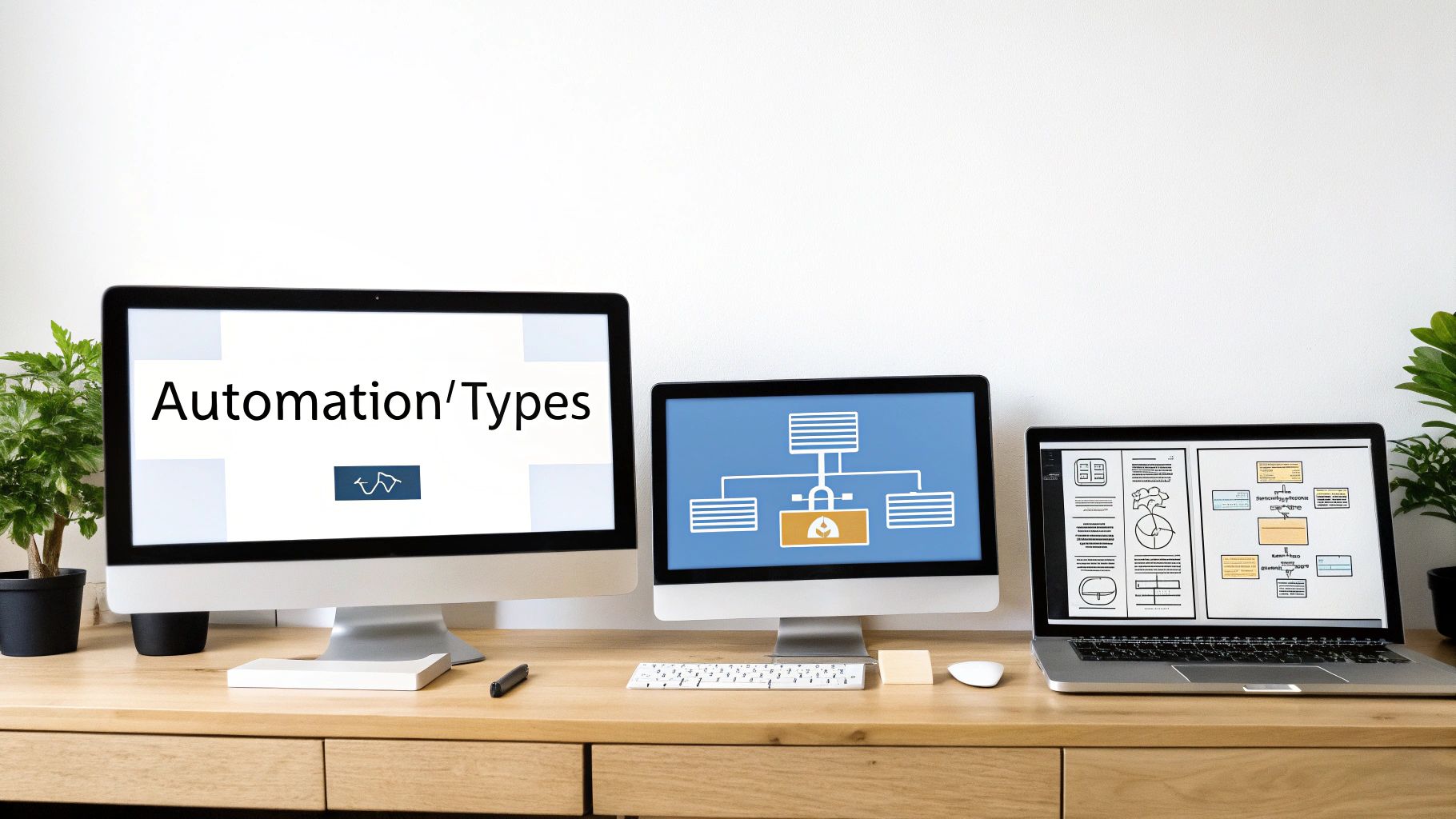
Choosing the right tool is your first real step toward smart automation, but the tech landscape can feel like a maze. Not all business process automation solutions are built the same; each one is engineered to solve a different kind of problem. Getting this choice right from the start is the key to avoiding a pricey tool that doesn't quite fit.
Let's break down the three main categories of automation tools you'll run into. We'll get into how they work, what they're good at, and who they're really for.
Robotic Process Automation: The Digital Assistant
Think of Robotic Process Automation (RPA) as a digital assistant or a "bot" that you can teach to mimic human actions on a computer. It's perfect for all those mind-numbing, screen-based tasks your team gets bogged down with—clicking buttons, copying data from a spreadsheet into your CRM, or filling out the same form over and over.
These bots work right on the user interface, interacting with applications just like a person would. They follow a strict set of pre-programmed rules, which makes them a godsend for working with older, legacy systems that don't have modern APIs. If you have a task that's high-volume, rules-based, and deals with structured data, RPA is a direct and powerful fix.
RPA's Core Function: To automate individual, repetitive tasks by interacting with application user interfaces, essentially acting as a digital replacement for manual clicks and keystrokes.
Workflow Orchestration Platforms: The Air Traffic Controller
While RPA is laser-focused on single tasks, Workflow Orchestration Platforms zoom out to manage entire end-to-end business processes. A great analogy is an air traffic controller who directs planes from takeoff to landing, managing countless moving parts along the way. That's what these platforms do for your business workflows.
They're designed to connect people, systems, and data to coordinate complex processes that stretch across multiple departments. Take new employee onboarding, for instance. It involves HR, IT, and Finance. An orchestration platform ensures every step happens in the right order, routes approvals to the correct manager, and integrates with all the necessary software, like your HRIS and accounting tools.
These platforms give you a bird's-eye view of the whole process, making them the go-to choice for optimizing the complex, multi-step operations that keep your business running.
Low-Code and No-Code Platforms: The LEGO Bricks
Low-Code and No-Code Platforms are all about putting the power of automation directly into the hands of non-technical users—often called "citizen developers." The best way to think of them is like a giant set of LEGO bricks. Business users can drag and drop pre-built components to assemble their own custom applications and workflows without ever having to write code.
This approach makes automation accessible to everyone, allowing teams in operations, finance, or marketing to solve their own problems without getting in line for IT. For example, a finance manager could build a simple app to track budget approvals in an afternoon.
Platforms like FlyDash are pushing this even further. They use AI to generate a complete, working app from a simple text description, taking you from an idea to a functional tool in minutes. This is perfect for building internal tools and quickly testing new ideas that are tailor-made for your team's unique way of working.
Comparing Business Process Automation Solutions
To help you figure out which tool might be the best fit, this table gives you a side-by-side comparison of RPA, Workflow Orchestration, and Low-Code/No-Code platforms.
| Solution Type | Best For | Technical Skill Required | Example Use Case |
|---|---|---|---|
| RPA | Automating repetitive, rules-based tasks on existing user interfaces. | Low to Medium (bot configuration) | Copying customer data from an email into a CRM system. |
| Workflow Orchestration | Managing complex, multi-step processes across different systems and departments. | Medium to High (process modeling) | Managing the entire employee onboarding process from offer letter to first day. |
| Low-Code/No-Code | Empowering business teams to quickly build custom apps and simple workflows. | None to Low (visual development) | Creating a custom tool for the marketing team to track campaign expenses. |
At the end of the day, the best business process automation solutions are the ones that solve your most pressing operational headaches. By understanding these three core types, you can make a smarter decision and pick a tool that will actually deliver results.
How to Choose the Right Automation Solution
Picking the right automation tool from a sea of options can feel overwhelming. It's easy to get lost in feature lists and marketing hype. But with the right mindset, you can zero in on a solution that actually adds value, not just another line item on your expense report. Think of it as choosing a partner for growth, not just buying a piece of software.
The sticker price is rarely the whole story. To get a real sense of the investment, you need to think in terms of Total Cost of Ownership (TCO). This goes way beyond the subscription fee and includes everything from implementation and data migration to training your team and ongoing maintenance.
A solution that looks cheap on paper can quickly become a money pit if it requires a ton of consulting hours to get running or a dedicated IT person to keep it from breaking. A clear-eyed view of the TCO is the only way to make a fair comparison and avoid nasty surprises down the road.
Assess Scalability and Future Needs
Your business is going to change, so your automation platform needs to be able to change with it. Scalability is one of the most important—and often overlooked—factors. Will this tool keep up when your transaction volume doubles, or will it grind to a halt?
You need to think about growth in two ways. Can it handle a massive increase in a single process, like churning out 10,000 invoices a month instead of 1,000? And can it expand to automate new processes across different departments, from HR to finance to operations?
The Litmus Test for Scalability: A truly scalable solution shouldn't require you to rip everything out and start over when you grow. It should adapt and expand right alongside your business, making sure your initial investment keeps paying you back for years.
This diagram shows a typical architecture for a business process automation setup. It’s a good visual for how the central automation engine has to talk to all your different data sources and user interfaces to get work done.
As you can see, integration is everything. The core engine needs to connect to databases, APIs, and all the other software you use.
Prioritize Integration and Security
An automation tool that can’t talk to your other systems is basically worthless. Solid integration capabilities are non-negotiable. The solution you pick absolutely must connect cleanly with the tech you already have, whether that’s your CRM, ERP, accounting software, or a custom-built database.
Look for platforms with a healthy library of pre-built connectors for common apps and a solid API for anything custom. Otherwise, you’re just creating new data silos—the very problem you were trying to solve in the first place.
Security and compliance are just as critical. Since these tools will be touching sensitive customer and financial data, they have to be locked down tight.
- Data Encryption: Is data encrypted both while it's moving and when it's stored?
- Access Controls: Can you set role-based permissions so people only see and do what they’re supposed to?
- Compliance Certifications: Does the vendor meet industry standards like HIPAA or SOC 2 if those are relevant to your business?
Create Your Evaluation Checklist
To make a smart decision, you have to know exactly what problem you're trying to solve. Don't go shopping for features; shop for a solution to a specific business pain. A simple checklist can keep your team focused on what actually matters.
Your Quick Evaluation Checklist:
- Define the Core Problem: What’s the first high-volume, rules-based process you’re going after? Be specific.
- Calculate Total Cost: What are the real costs for implementation, training, and support on top of the license fee?
- Confirm Integration: Does it play nice with your key systems (like Salesforce, QuickBooks, or your SQL databases)?
- Verify Security: Does it tick all the boxes for your industry’s compliance and data protection rules?
- Test Usability: Can your non-technical folks actually build and manage workflows with it? Get a demo and find out.
By sticking to this framework, you can confidently pick a business process automation solution that solves today’s headaches and sets you up for a more efficient, resilient future.
A Step-by-Step Guide to Your Implementation Strategy
Having the right tool is one thing; actually putting it to work effectively is a whole other ball game. Successfully rolling out business process automation solutions isn't about flipping a switch and hoping for the best—it requires a deliberate, phased strategy. Jumping in without a clear plan is a surefire way to end up with wasted time and frustrated teams.
Think of a structured implementation as your roadmap. It guides you from a small, controlled pilot project all the way to a full-scale deployment that delivers real, measurable value. This approach minimizes risk, builds momentum, and sets your automation efforts up for long-term success right from the start.
Phase 1: Identify and Prioritize Your First Process
This first step is arguably the most critical: deciding what to automate first. It’s tempting to try and boil the ocean, but that’s a common mistake. Instead, focus on finding the perfect candidate for your initial project—a process that’s high-impact but low-risk.
Look for tasks that are repetitive, rule-based, and eat up a significant chunk of your team’s time. Think about things like processing accounts payable, generating weekly reports, or handling initial customer data entry. These are often the "low-hanging fruit" where you can score a quick, tangible win.
The Goal for Your First Project: Don't aim for a revolutionary change right out of the gate. Your real objective is to prove the concept, show tangible value, and build the confidence and skills your team needs for bigger, more complex projects down the line. A successful pilot creates the buy-in you need for wider adoption.
To help narrow down your choices, this simple flowchart breaks down the selection process, moving from analyzing needs to evaluating options and finally, picking the best fit.
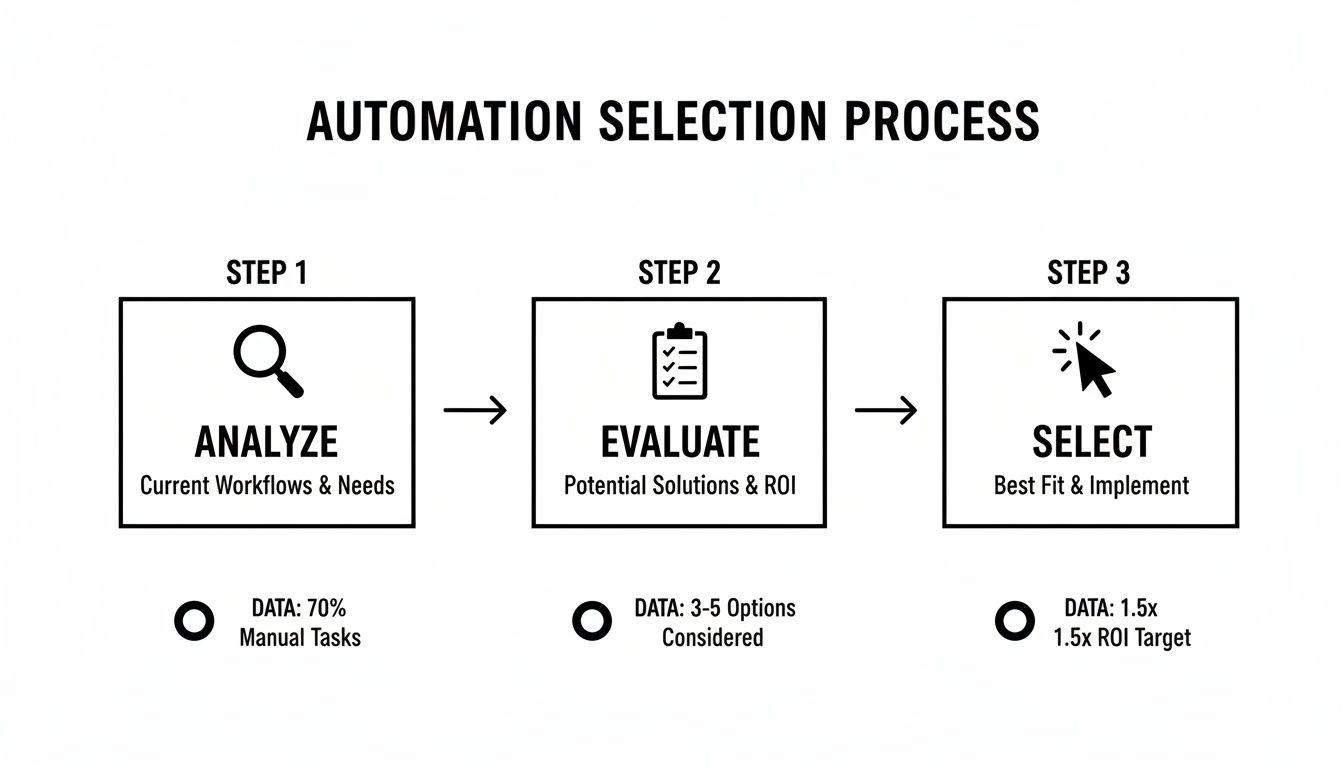
As you can see, a winning automation strategy always starts with a deep dive into your current pain points before you even start looking at different tools.
Phase 2: Map and Build Your Automated Workflow
Once you’ve picked your process, it’s time to map it out. I mean really map it out. Document every single step, decision point, and system interaction involved in the current manual workflow. Getting this level of clarity is absolutely essential for designing an efficient automated replacement.
This is also the perfect moment to optimize. Don't just automate a clunky process; use this opportunity to get rid of redundant steps and simplify the workflow before you build. With a clean map in hand, you can start building the automation in your chosen tool. For a platform like FlyDash, this might be as straightforward as describing the workflow and letting AI generate the initial app for you.
Phase 3: Test and Deploy in a Pilot Program
Before you unleash your new automation on the entire company, run a controlled pilot program with a small, dedicated group of users. This creates a safe space to iron out any kinks and gather crucial, real-world feedback.
The pilot phase lets you confirm the automation actually works as expected in a live environment. You can validate data accuracy, test your integrations, and make sure the user experience is smooth and intuitive.
Use the feedback you get to make adjustments. The key here is to iterate quickly, refining the solution until it’s robust, reliable, and ready for a wider audience. Once your pilot group gives it the green light, you can confidently move forward with a full deployment to the relevant team or department.
Phase 4: Monitor Performance with Clear KPIs
Your work isn't over once the automation goes live. To understand the true impact of your efforts, you have to measure its performance against clear Key Performance Indicators (KPIs). These metrics are how you prove the value of your investment and pinpoint areas for future improvement.
Here are a few essential KPIs to keep an eye on:
- Process Cycle Time: How much faster is the automated process compared to the old manual one? A 70% reduction in invoice processing time is a powerful result to report.
- Error Rate Reduction: Track the drop in human errors. Going from a 5% manual error rate to less than 1% with automation is a massive win for data quality.
- Cost Per Transaction: Calculate the new, lower cost of completing the task, factoring in both time savings and any software expenses.
- Employee Satisfaction: Don't forget the human element. Survey your team to see how automation has affected their workload and job satisfaction. Freeing them from tedious work is a major, often overlooked, benefit.
By diligently tracking these metrics, you can quantify the success of your business process automation solutions and build an undeniable business case for expanding your efforts across the organization.
Seeing Automation in Action Across Your Business

Theory is great, but the real magic of business process automation solutions happens when you see them solve actual, everyday problems. These tools are fundamentally changing how departments get work done, shifting them away from reactive, manual chores toward proactive, intelligent systems. Let's look at how automation is making a real difference in a few key areas of the business.
This isn't some future trend; it's happening right now. Nearly 60% of organizations around the world have already put some form of process automation in place, and that number jumps to 84% for large companies. The "why" is simple: they're chasing better product quality, higher productivity, and lower labor costs. We're seeing incredible success stories, like an insurance company that slashed its claims processing time by a staggering 70%. You can dig into more stats and facts about the widespread adoption of business automation to see the full picture.
Transforming the Finance Department
Finance teams are often drowning in repetitive, detail-heavy tasks, which makes them the perfect candidates for automation. The accounts payable (AP) process is a classic example. Done manually, it’s a slow, frustrating crawl of printing invoices, chasing managers for signatures, and mind-numbing data entry.
A BPA solution completely re-engineers this workflow.
- Automated Invoice Capture: Instead of a person reading an invoice, smart software uses AI to scan it—whether it's a PDF or a piece of paper—and pull out the important data like vendor name, invoice number, and the total amount due.
- Smart Approval Routing: The system knows exactly who needs to sign off. It automatically sends the invoice to the right department head based on your business rules and follows up with reminders until it’s approved.
- Seamless System Integration: Once approved, the data flows directly into the company’s ERP or accounting software for payment. No one has to type a thing, and you get a perfect audit trail.
The impact is immediate and significant. Companies routinely report cutting their invoice processing times by over 70%. This frees up their AP teams to focus on higher-value work, like negotiating better terms with vendors or analyzing cash flow.
Revolutionizing Operations and Logistics
For anyone in operations, efficiency and accuracy are the name of the game. In logistics and supply chain, a tiny mistake can snowball into expensive delays and frustrated customers. Imagine a logistics company trying to track inventory and fulfill orders with spreadsheets and manual checks. It's a recipe for shipping the wrong item or running out of a popular product without warning.
By implementing a workflow automation solution, that company can link its warehouse management system (WMS) directly to its e-commerce platform.
The Impact on Operations: When an order is placed online, the automation kicks in. It instantly confirms inventory, assigns the picking and packing task to the nearest warehouse worker on their handheld device, and prints the correct shipping label. This end-to-end automation can lead to an 80% reduction in shipping errors and gives everyone real-time visibility into stock levels.
This doesn't just cut costs; it dramatically improves the customer experience. A once-chaotic process becomes a smooth, reliable operation that can give a company a serious competitive edge.
Elevating the Employee and Customer Experience
Automation’s reach goes far beyond the back office. Human resources and customer support teams are also reaping huge benefits from it.
HR Onboarding: Bringing a new employee into the company manually is a mess of paperwork and frantic coordination between IT, HR, and the hiring manager. An automated workflow can orchestrate the entire journey—from sending the offer letter and collecting digital signatures to setting up system access and scheduling orientation. It creates a smooth, professional experience for every new hire, right from day one.
Customer Support Ticketing: Support teams can easily get buried under an avalanche of incoming requests. Automation can act as the first line of defense. It can triage tickets by identifying keywords, route complex issues to the right expert, and even provide instant answers to common questions by pulling from a knowledge base. This means faster response times and happier customers, while your support agents can focus their energy on solving the truly tough problems.
From paying the bills to keeping customers happy, business process automation solutions are proving to be one of the most powerful ways to build a smarter, faster, and more scalable organization.
Common Questions About Automation Solutions
Jumping into automation can feel a bit overwhelming. The tech can seem complex, and it’s totally normal to have a ton of questions about how it all works and where to even start. Getting clear, simple answers is the first step to moving forward with confidence.
This section is all about tackling the most common questions we hear from leaders about business process automation solutions. We'll cut through the jargon, offer some practical advice on getting started, and talk about the real-world challenges you're likely to face.
What Is the Difference Between BPA and RPA
It’s easy to get these two mixed up, but the difference is pretty important. The simplest way to think about it is this: Robotic Process Automation (RPA) is a specific tool, while Business Process Automation (BPA) is the entire strategic project.
RPA is like a digital assistant you train to do a single, repetitive task by mimicking what a person does on a computer. A classic example is a bot that copies customer info from a spreadsheet and pastes it into your CRM. It’s a tactical solution, perfect for automating one-off steps in a larger process.
BPA, on the other hand, is the whole enchilada. It’s about orchestrating an entire business workflow from start to finish, which might involve multiple systems, human decision points, and data moving between departments. A full BPA solution might use an RPA bot for one small piece of the puzzle, but its real job is to streamline the entire journey.
How Do I Identify the Best Process to Automate First
The secret to getting started is to aim for a quick, visible win. Don't try to boil the ocean by automating your most complicated, mission-critical process right out of the gate. Instead, look for the biggest bottlenecks and the most mind-numbing, soul-crushing work your team is forced to do.
The best first candidates for automation usually have a few things in common:
- High Volume: The task happens over and over again, every single day or week.
- Rule-Based: It follows a clear "if this, then that" logic with very few exceptions.
- Prone to Human Error: Things like manual data entry or copy-pasting often lead to mistakes that cost time and money to fix.
Just ask your team, "What's the one tedious task that takes up way too much time but requires almost no brainpower?" You'll quickly find your starting point in areas like invoice processing, generating weekly reports, or handling new hire paperwork.
Choosing a process where a successful automation delivers a clear, measurable result is crucial. This initial victory builds momentum and makes it much easier to get executive and team buy-in for future automation projects.
Are Automation Solutions Only for Large Companies
This is one of the biggest myths out there. While big corporations were definitely the early adopters, that’s just not the reality anymore. Modern business process automation solutions are now completely accessible for businesses of all sizes, from startups to mid-sized companies.
The boom in cloud-based Software-as-a-Service (SaaS) and low-code/no-code platforms has made these powerful tools both affordable and easy to use. Most solutions now run on a subscription model, which means you don't need a massive upfront investment in servers or infrastructure.
Even better, platforms like FlyDash empower people without a technical background to build their own solutions. This completely levels the playing field, allowing smaller businesses to gain the same operational efficiency and accuracy as their much larger competitors.
What Are the Biggest Implementation Challenges to Avoid
Interestingly, the biggest roadblocks in an automation project are rarely about the technology. They almost always come down to people and processes. Just buying a fancy tool without thinking through the underlying workflow is a surefire way to fail.
One of the most common traps is automating a broken process. If your manual workflow is already a clunky, inefficient mess, automating it just helps you do the wrong thing faster. It is absolutely essential to analyze, simplify, and fix the process before you write a single line of code or build a workflow.
Another huge challenge is overcoming employee resistance. If your team sees automation as a threat to their jobs, they'll never fully embrace it. The only way to get ahead of this is with clear, honest, and frequent communication.
You have to frame automation as a tool that helps them, not one that replaces them. Make it clear that the goal is to free them from the boring, repetitive parts of their jobs so they can focus on more valuable work that requires uniquely human skills—like creative problem-solving and building customer relationships.
Ready to build the internal tools that will drive your automation strategy forward? With FlyDash, you can generate a complete working app from a simple text description, connect to your live data sources, and empower your team to build the solutions they need in minutes, not months.
Start building your first automated app with FlyDash today.
Ready to Build Your App?
Turn your idea into a production-ready React Native app in minutes.
Free tools to get you started
Free AI PRD Generator
Generate a professional product requirements document in seconds. Describe your product idea and get a complete, structured PRD instantly.
Try it freeFree AI App Name Generator
Generate unique, brandable app name ideas with AI. Get creative name suggestions with taglines, brand colors, and monogram previews.
Try it freeFree AI App Icon Generator
Generate beautiful, professional app icons with AI. Describe your app and get multiple icon variations in different styles, ready for App Store and Google Play.
Try it freeFrequently Asked Questions
RapidNative is an AI-powered mobile app builder. Describe the app you want in plain English and RapidNative generates real, production-ready React Native screens you can preview, edit, and publish to the App Store or Google Play.